1. HTTP Bridge overview
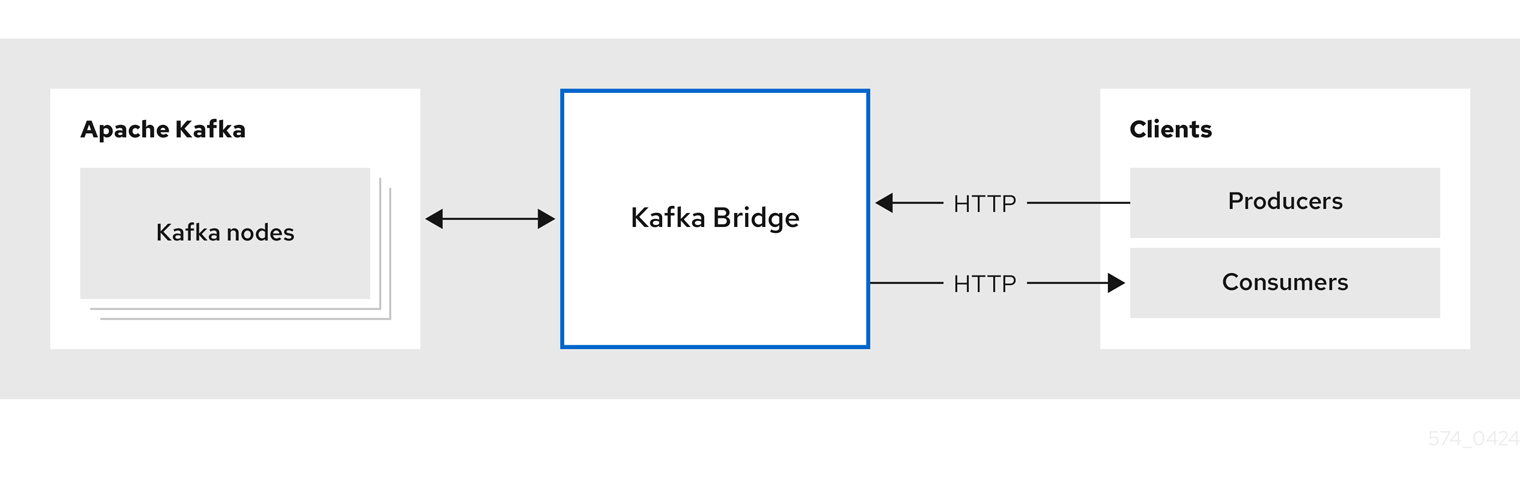
Use the HTTP Bridge to make HTTP requests to a Kafka cluster.
You can use the HTTP Bridge to integrate HTTP client applications with your Kafka cluster.
1.1. Running the HTTP Bridge
Install the HTTP Bridge to run in the same environment as your Kafka cluster.
You can download and add the HTTP Bridge installation artifacts to your host machine. To try out the HTTP Bridge in your local environment, see the HTTP Bridge quickstart.
1.1.1. Running the HTTP Bridge on Kubernetes
If you deployed Strimzi on Kubernetes, you can use the Strimzi Cluster Operator to deploy the HTTP Bridge to the Kubernetes cluster.
Configure and deploy the HTTP Bridge as a KafkaBridge resource.
You’ll need a running Kafka cluster that was deployed by the Cluster Operator in a Kubernetes namespace.
You can configure your deployment to access the HTTP Bridge outside the Kubernetes cluster.
Running multiple replicas of the HTTP Bridge in a single Kubernetes Deployment is not recommended for consumer workloads.
Each pod maintains its own consumer state, and pods can be restarted or rescheduled by Kubernetes.
If the HTTP Bridge pod running a consumer is restarted, the HTTP client must recreate any consumers or subscriptions.
For information on deploying and configuring the HTTP Bridge as a KafkaBridge resource, see the Strimzi Custom Resource API Reference.
1.1.2. Running the HTTP Bridge with high availability
While the HTTP Bridge provides a RESTful interface for Kafka, its handling of consumer operations affects how it can be scaled for high availability (HA).
Understanding the limitations
Each HTTP Bridge instance maintains its own in-memory consumers and subscriptions. This state is not shared between instances.
When an HTTP client creates a consumer, the corresponding Kafka consumer is created on the specific bridge instance that handles the request. All subsequent requests for that consumer must be handled by the same instance.
Because consumer state is instance-specific, running multiple replicas of the HTTP Bridge does not provide high availability for consumers.
If a bridge instance restarts, all consumers and subscriptions created on that instance are lost. Client applications must recreate them if the bridge instance becomes unavailable.
Making producer traffic highly available
Producer requests are stateless. They can be handled by any available HTTP Bridge instance.
You can deploy multiple bridge instances and use a load balancer or service to distribute producer traffic. This improves availability and throughput for producing records.
Constraining consumer traffic to a single instance
Consumer state is local to each HTTP Bridge instance. This affects how consumer traffic can be scaled and routed for high availability.
Consumer operations require client affinity to a specific HTTP Bridge instance. An HTTP client must continue sending requests to the same instance where the consumer was created.
Maintaining this affinity is the responsibility of the client application. Routing consumer requests to a different instance breaks the consumer session.
Handling consumer recovery
The HTTP Bridge does not provide automatic consumer failover.
If a bridge instance becomes unavailable, all consumers running on that instance are terminated. This is equivalent to a Kafka client process stopping.
In this situation, client applications must do the following:
-
Recreate consumers and subscriptions
-
Resume consumption from the Kafka cluster
1.2. HTTP Bridge interface
The HTTP Bridge provides a RESTful interface that allows HTTP-based clients to interact with a Kafka cluster. It offers the advantages of a web API connection to Strimzi, without the need for client applications to interpret the Kafka protocol.
The API has two main resources — consumers and topics — that are exposed and made accessible through endpoints to interact with consumers and producers in your Kafka cluster. The resources relate only to the HTTP Bridge, not the consumers and producers connected directly to Kafka.
1.2.1. HTTP requests
The HTTP Bridge supports HTTP requests to a Kafka cluster, with methods to:
-
Send messages to a topic.
-
Retrieve messages from topics.
-
Retrieve a list of partitions for a topic.
-
Create and delete consumers.
-
Subscribe consumers to topics, so that they start receiving messages from those topics.
-
Retrieve a list of topics that a consumer is subscribed to.
-
Unsubscribe consumers from topics.
-
Assign partitions to consumers.
-
Commit a list of consumer offsets.
-
Seek on a partition, so that a consumer starts receiving messages from the first or last offset position, or a given offset position.
The methods provide JSON responses and HTTP response code error handling. Messages can be sent in JSON or binary formats.
Clients can produce and consume messages without the requirement to use the native Kafka protocol.
1.3. HTTP Bridge OpenAPI specification
HTTP Bridge APIs use the OpenAPI Specification (OAS). OAS provides a standard framework for describing and implementing HTTP APIs.
The HTTP Bridge OpenAPI specification is in JSON format.
You can find the OpenAPI JSON files in the src/main/resources/ folder of the HTTP Bridge source download files.
The download files are available from the GitHub release page.
You can also use the GET /openapi method to retrieve the OpenAPI v3 specification in JSON format.
1.4. Securing connectivity to the Kafka cluster
You can configure the following between the HTTP Bridge and your Kafka cluster:
-
TLS or SASL-based authentication
-
A TLS-encrypted connection
You configure the HTTP Bridge for authentication through its properties file.
You can also use ACLs in Kafka brokers to restrict the topics that can be consumed and produced using the HTTP Bridge.
|
Note
|
Use the KafkaBridge resource to configure authentication when you are running the HTTP Bridge on Kubernetes.
|
1.5. Securing the HTTP Bridge HTTP interface
By default, connections between HTTP clients and HTTP Bridge are not encrypted, but you can configure a TLS-encrypted connection through its properties file. If the HTTP Bridge is configured with TLS encryption, client requests should connect to the bridge by using HTTPS instead of HTTP.
You can enable TLS encryption for all HTTP Bridge endpoints except management endpoints such as /ready, /healthy and /metrics.
These endpoints are typically used only by internal clients and requests to them must use HTTP.
Authentication between HTTP clients and the HTTP Bridge is not supported directly by the HTTP Bridge. You can combine the HTTP Bridge with the following tools to secure it further:
-
Network policies and firewalls that define which pods can access the HTTP Bridge
-
Reverse proxies (for example, OAuth 2.0)
-
API gateways
If any of these tools used, for example, a reverse proxy to add authentication between HTTP clients and the HTTP Bridge, then the proxy should be configured with TLS to encrypt the connections between HTTP clients and the proxy.
1.6. Requests to the HTTP Bridge
Specify data formats and HTTP headers to ensure valid requests are submitted to the HTTP Bridge.
1.6.1. Content Type headers
API request and response bodies are always encoded as JSON.
-
When performing consumer operations,
POSTrequests must provide the followingContent-Typeheader if there is a non-empty body:Content-Type: application/vnd.kafka.v2+json -
When performing producer operations,
POSTrequests must provideContent-Typeheaders specifying the embedded data format of the messages produced. This can be eitherjson,binaryortext.Embedded data format Content-Type header JSON
Content-Type: application/vnd.kafka.json.v2+jsonBinary
Content-Type: application/vnd.kafka.binary.v2+jsonText
Content-Type: application/vnd.kafka.text.v2+json
The embedded data format is set per consumer, as described in the next section.
The Content-Type must not be set if the POST request has an empty body.
An empty body can be used to create a consumer with the default values.
1.6.2. Embedded data format
The embedded data format is the format of the Kafka messages that are transmitted, over HTTP, from a producer to a consumer using the HTTP Bridge. Three embedded data formats are supported: JSON, binary and text.
When creating a consumer using the /consumers/groupid endpoint, the POST request body must specify an embedded data format of either JSON, binary or text. This is specified in the format field, for example:
{
  "name": "my-consumer",
  "format": "binary", # (1)
  # ...
}-
A binary embedded data format.
The embedded data format specified when creating a consumer must match the data format of the Kafka messages it will consume.
If you choose to specify a binary embedded data format, subsequent producer requests must provide the binary data in the request body as Base64-encoded strings. For example, when sending messages using the /topics/topicname endpoint, records.key and records.value must be encoded in Base64:
{
  "records": [
    {
      "key": "bXkta2V5",
      "value": "ZWR3YXJkdGhldGhyZWVsZWdnZWRjYXQ="
    },
  ]
}
Producer requests must also provide a Content-Type header that corresponds to the embedded data format, for example, Content-Type: application/vnd.kafka.binary.v2+json.
1.6.3. Message format
When sending messages using the /topics endpoint, you enter the message payload in the request body, in the records parameter.
The records parameter can contain any of these optional fields:
-
Message
headers -
Message
key -
Message
value -
Destination
partition
POST request to /topicscurl -X POST \
http://localhost:8080/topics/my-topic \
-H 'content-type: application/vnd.kafka.json.v2+json' \
-d '{
"records": [
{
"key": "my-key",
"value": "sales-lead-0001",
"partition": 2,
"headers": [
{
"key": "key1",
"value": "QXBhY2hlIEthZmthIGlzIHRoZSBib21iIQ==" (1)
}
]
}
]
}'-
The header value in binary format and encoded as Base64.
Please note that if your consumer is configured to use the text embedded data format, the value and key field in the records parameter must be a string and not a JSON object.
1.6.4. Accept headers
After creating a consumer, all subsequent GET requests must provide an Accept header in the following format:
Accept: application/vnd.kafka.EMBEDDED-DATA-FORMAT.v2+jsonThe EMBEDDED-DATA-FORMAT is either json, binary or text.
For example, when retrieving records for a subscribed consumer using an embedded data format of JSON, include this Accept header:
Accept: application/vnd.kafka.json.v2+json1.7. CORS
In general, it is not possible for an HTTP client to issue requests across different domains.
For example, suppose the HTTP Bridge you deployed alongside a Kafka cluster is accessible using the http://my-bridge.io domain.
HTTP clients can use the URL to interact with the HTTP Bridge and exchange messages through the Kafka cluster.
However, your client is running as a web application in the http://my-web-application.io domain.
The client (source) domain is different from the HTTP Bridge (target) domain.
Because of same-origin policy restrictions, requests from the client fail.
You can avoid this situation by using Cross-Origin Resource Sharing (CORS).
CORS allows for simple and preflighted requests between origin sources on different domains.
Simple requests are suitable for standard requests using GET, HEAD, POST methods.
A preflighted request sends a HTTP OPTIONS request as an initial check that the actual request is safe to send.
On confirmation, the actual request is sent.
Preflight requests are suitable for methods that require greater safeguards, such as PUT and DELETE,
and use non-standard headers.
All requests require an origins value in their header, which is the source of the HTTP request.
CORS allows you to specify allowed methods and originating URLs for accessing the Kafka cluster in your HTTP Bridge HTTP configuration.
# ...
http.cors.enabled=true
http.cors.allowedOrigins=http://my-web-application.io
http.cors.allowedMethods=GET,POST,PUT,DELETE,OPTIONS,PATCH
1.7.1. Simple request
For example, this simple request header specifies the origin as http://my-web-application.io.
Origin: http://my-web-application.ioThe header information is added to the request to consume records.
curl -v -X GET HTTP-BRIDGE-ADDRESS/consumers/my-group/instances/my-consumer/records \
-H 'Origin: http://my-web-application.io'\
-H 'content-type: application/vnd.kafka.v2+json'
In the response from the HTTP Bridge, an Access-Control-Allow-Origin header is returned.
It contains the list of domains from where HTTP requests can be issued to the bridge.
HTTP/1.1 200 OK
Access-Control-Allow-Origin: * (1)-
Returning an asterisk (
*) shows the resource can be accessed by any domain.
1.7.2. Preflighted request
An initial preflight request is sent to HTTP Bridge using an OPTIONS method.
The HTTP OPTIONS request sends header information to check that HTTP Bridge will allow the actual request.
Here the preflight request checks that a POST request is valid from http://my-web-application.io.
OPTIONS /my-group/instances/my-consumer/subscription HTTP/1.1
Origin: http://my-web-application.io
Access-Control-Request-Method: POST (1)
Access-Control-Request-Headers: Content-Type (2)-
HTTP Bridge is alerted that the actual request is a
POSTrequest. -
The actual request will be sent with a
Content-Typeheader.
OPTIONS is added to the header information of the preflight request.
curl -v -X OPTIONS -H 'Origin: http://my-web-application.io' \
-H 'Access-Control-Request-Method: POST' \
-H 'content-type: application/vnd.kafka.v2+json'
HTTP Bridge responds to the initial request to confirm that the request will be accepted. The response header returns allowed origins, methods and headers.
HTTP/1.1 200 OK
Access-Control-Allow-Origin: http://my-web-application.io
Access-Control-Allow-Methods: GET,POST,PUT,DELETE,OPTIONS,PATCH
Access-Control-Allow-Headers: content-type
If the origin or method is rejected, an error message is returned.
The actual request does not require Access-Control-Request-Method header, as it was confirmed in the preflight request,
but it does require the origin header.
curl -v -X POST HTTP-BRIDGE-ADDRESS/topics/bridge-topic \
-H 'Origin: http://my-web-application.io' \
-H 'content-type: application/vnd.kafka.v2+json'
The response shows the originating URL is allowed.
HTTP/1.1 200 OK
Access-Control-Allow-Origin: http://my-web-application.io1.8. Configuring loggers for the HTTP Bridge
You can set a different log level for each operation that is defined by the HTTP Bridge OpenAPI specification.
Each operation has a corresponding API endpoint through which the bridge receives requests from HTTP clients. You can change the log level on each endpoint to produce more or less fine-grained logging information about the incoming and outgoing HTTP requests.
Loggers are defined in the log4j2.properties file, which has the following default configuration for healthy and ready endpoints:
logger.healthy.name = http.openapi.operation.healthy
logger.healthy.level = WARN
logger.ready.name = http.openapi.operation.ready
logger.ready.level = WARN
The log level of all other operations is set to INFO by default.
Loggers are formatted as follows:
logger.<operation_id>.name = http.openapi.operation.<operation_id>
logger.<operation_id>_level = _<LOG_LEVEL>
Where <operation_id> is the identifier of the specific operation.
-
createConsumer -
deleteConsumer -
subscribe -
unsubscribe -
poll -
assign -
commit -
send -
sendToPartition -
seekToBeginning -
seekToEnd -
seek -
healthy -
ready -
openapi
Where <LOG_LEVEL> is the logging level as defined by log4j2 (i.e. INFO, DEBUG, …).
2. HTTP Bridge quickstart
Use this quickstart to try out the HTTP Bridge in your local development environment.
You will learn how to do the following:
-
Produce messages to topics and partitions in your Kafka cluster
-
Create a HTTP Bridge consumer
-
Perform basic consumer operations, such as subscribing the consumer to topics and retrieving the messages that you produced
In this quickstart, HTTP requests are formatted as curl commands that you can copy and paste to your terminal.
Ensure you have the prerequisites and then follow the tasks in the order provided in this chapter.
In this quickstart, you will produce and consume messages in JSON format.
-
A Kafka cluster is running on the host machine.
2.1. Downloading a HTTP Bridge archive
A zipped distribution of the HTTP Bridge is available for download.
-
Download the latest version of the HTTP Bridge archive from the GitHub release page.
2.2. Installing the HTTP Bridge
Use the script provided with the HTTP Bridge archive to install the HTTP Bridge.
The application.properties file provided with the installation archive provides default configuration settings.
The following default property values configure the HTTP Bridge to listen for requests on port 8080.
http.host=0.0.0.0
http.port=8080-
If you have not already done so, unzip the HTTP Bridge installation archive to any directory.
-
Run the HTTP Bridge script using the configuration properties as a parameter:
For example:
./bin/kafka_bridge_run.sh --config-file=<path>/application.properties -
Check to see that the installation was successful in the log.
HTTP Bridge started and listening on port 8080
HTTP Bridge bootstrap servers localhost:9092
2.3. Producing messages to topics and partitions
Use the HTTP Bridge to produce messages to a Kafka topic in JSON format by using the topics endpoint.
You can produce messages to topics in JSON format by using the topics endpoint. You can specify destination partitions for messages in the request body. The partitions endpoint provides an alternative method for specifying a single destination partition for all messages as a path parameter.
In this procedure, messages are produced to a topic called bridge-quickstart-topic.
-
The Kafka cluster has a topic with three partitions.
You can use the
kafka-topics.shutility to create topics.Example topic creation with three partitionsbin/kafka-topics.sh --bootstrap-server localhost:9092 --create --topic bridge-quickstart-topic --partitions 3 --replication-factor 1Verifying the topic was createdbin/kafka-topics.sh --bootstrap-server localhost:9092 --describe --topic bridge-quickstart-topic
|
Note
|
If you deployed Strimzi on Kubernetes, you can create a topic using the KafkaTopic custom resource.
|
-
Using the HTTP Bridge, produce three messages to the topic you created:
curl -X POST \ http://localhost:8080/topics/bridge-quickstart-topic \ -H 'content-type: application/vnd.kafka.json.v2+json' \ -d '{ "records": [ { "key": "my-key", "value": "sales-lead-0001" }, { "value": "sales-lead-0002", "partition": 2 }, { "value": "sales-lead-0003" } ] }'-
sales-lead-0001is sent to a partition based on the hash of the key. -
sales-lead-0002is sent directly to partition 2. -
sales-lead-0003is sent to a partition in thebridge-quickstart-topictopic using a round-robin method.
-
-
If the request is successful, the HTTP Bridge returns an
offsetsarray, along with a200code and acontent-typeheader ofapplication/vnd.kafka.v2+json. For each message, theoffsetsarray describes:-
The partition that the message was sent to
-
The current message offset of the partition
Example response#... { "offsets":[ { "partition":0, "offset":0 }, { "partition":2, "offset":0 }, { "partition":0, "offset":1 } ] }
-
Make other curl requests to find information on topics and partitions.
- List topics
-
curl -X GET \
  http://localhost:8080/topics
Example response[ "__strimzi_store_topic", "__strimzi-topic-operator-kstreams-topic-store-changelog", "bridge-quickstart-topic", "my-topic" ] - Get topic configuration and partition details
-
curl -X GET \
  http://localhost:8080/topics/bridge-quickstart-topic
Example response{ "name": "bridge-quickstart-topic", "configs": { "compression.type": "producer", "leader.replication.throttled.replicas": "", "min.insync.replicas": "1", "message.downconversion.enable": "true", "segment.jitter.ms": "0", "cleanup.policy": "delete", "flush.ms": "9223372036854775807", "follower.replication.throttled.replicas": "", "segment.bytes": "1073741824", "retention.ms": "604800000", "flush.messages": "9223372036854775807", "message.format.version": "2.8-IV1", "max.compaction.lag.ms": "9223372036854775807", "file.delete.delay.ms": "60000", "max.message.bytes": "1048588", "min.compaction.lag.ms": "0", "message.timestamp.type": "CreateTime", "preallocate": "false", "index.interval.bytes": "4096", "min.cleanable.dirty.ratio": "0.5", "unclean.leader.election.enable": "false", "retention.bytes": "-1", "delete.retention.ms": "86400000", "segment.ms": "604800000", "message.timestamp.difference.max.ms": "9223372036854775807", "segment.index.bytes": "10485760" }, "partitions": [ { "partition": 0, "leader": 0, "replicas": [ { "broker": 0, "leader": true, "in_sync": true }, { "broker": 1, "leader": false, "in_sync": true }, { "broker": 2, "leader": false, "in_sync": true } ] }, { "partition": 1, "leader": 2, "replicas": [ { "broker": 2, "leader": true, "in_sync": true }, { "broker": 0, "leader": false, "in_sync": true }, { "broker": 1, "leader": false, "in_sync": true } ] }, { "partition": 2, "leader": 1, "replicas": [ { "broker": 1, "leader": true, "in_sync": true }, { "broker": 2, "leader": false, "in_sync": true }, { "broker": 0, "leader": false, "in_sync": true } ] } ] } - List the partitions of a specific topic
-
curl -X GET \
  http://localhost:8080/topics/bridge-quickstart-topic/partitions
Example response[ { "partition": 0, "leader": 0, "replicas": [ { "broker": 0, "leader": true, "in_sync": true }, { "broker": 1, "leader": false, "in_sync": true }, { "broker": 2, "leader": false, "in_sync": true } ] }, { "partition": 1, "leader": 2, "replicas": [ { "broker": 2, "leader": true, "in_sync": true }, { "broker": 0, "leader": false, "in_sync": true }, { "broker": 1, "leader": false, "in_sync": true } ] }, { "partition": 2, "leader": 1, "replicas": [ { "broker": 1, "leader": true, "in_sync": true }, { "broker": 2, "leader": false, "in_sync": true }, { "broker": 0, "leader": false, "in_sync": true } ] } ] - List the details of a specific topic partition
-
curl -X GET \
  http://localhost:8080/topics/bridge-quickstart-topic/partitions/0
Example response{ "partition": 0, "leader": 0, "replicas": [ { "broker": 0, "leader": true, "in_sync": true }, { "broker": 1, "leader": false, "in_sync": true }, { "broker": 2, "leader": false, "in_sync": true } ] } - List the offsets of a specific topic partition
-
curl -X GET \
  http://localhost:8080/topics/bridge-quickstart-topic/partitions/0/offsets
Example response{ "beginning_offset": 0, "end_offset": 1 }
After producing messages to topics and partitions, create a HTTP Bridge consumer.
2.4. Creating a HTTP Bridge consumer
Before you can perform any consumer operations in the Kafka cluster, you must first create a consumer by using the consumers endpoint. The consumer is referred to as a HTTP Bridge consumer.
-
Create a HTTP Bridge consumer in a new consumer group named
bridge-quickstart-consumer-group:curl -X POST http://localhost:8080/consumers/bridge-quickstart-consumer-group \ -H 'content-type: application/vnd.kafka.v2+json' \ -d '{ "name": "bridge-quickstart-consumer", "auto.offset.reset": "earliest", "format": "json", "enable.auto.commit": false, "fetch.min.bytes": 512, "consumer.request.timeout.ms": 30000 }'-
The consumer is named
bridge-quickstart-consumerand the embedded data format is set asjson. -
Some basic configuration settings are defined.
-
The consumer will not commit offsets to the log automatically because the
enable.auto.commitsetting isfalse. You will commit the offsets manually later in this quickstart.If the request is successful, the HTTP Bridge returns the consumer ID (
instance_id) and base URL (base_uri) in the response body, along with a200code.Example response#... { "instance_id": "bridge-quickstart-consumer", "base_uri":"http://<bridge_id>-bridge-service:8080/consumers/bridge-quickstart-consumer-group/instances/bridge-quickstart-consumer" }
-
-
Copy the base URL (
base_uri) to use in the other consumer operations in this quickstart.
Now that you have created a HTTP Bridge consumer, you can subscribe it to topics.
2.5. Subscribing a HTTP Bridge consumer to topics
After you have created a HTTP Bridge consumer, subscribe it to one or more topics by using the subscription endpoint. When subscribed, the consumer starts receiving all messages that are produced to the topic.
-
Subscribe the consumer to the
bridge-quickstart-topictopic that you created earlier, in Producing messages to topics and partitions:curl -X POST http://localhost:8080/consumers/bridge-quickstart-consumer-group/instances/bridge-quickstart-consumer/subscription \ -H 'content-type: application/vnd.kafka.v2+json' \ -d '{ "topics": [ "bridge-quickstart-topic" ] }'The
topicsarray can contain a single topic (as shown here) or multiple topics. If you want to subscribe the consumer to multiple topics that match a regular expression, you can use thetopic_patternstring instead of thetopicsarray.If the request is successful, the HTTP Bridge returns a
204(No Content) code only.
When using an Apache Kafka client, the HTTP subscribe operation adds topics to the local consumer’s subscriptions. Joining a consumer group and obtaining partition assignments occur after running multiple HTTP poll operations, starting the partition rebalance and join-group process. It’s important to note that the initial HTTP poll operations may not return any records.
After subscribing a HTTP Bridge consumer to topics, you can retrieve messages from the consumer.
2.6. Retrieving the latest messages from a HTTP Bridge consumer
Retrieve the latest messages from the HTTP Bridge consumer by requesting data from the records endpoint. In production, HTTP clients can call this endpoint repeatedly (in a loop).
-
Produce additional messages to the HTTP Bridge consumer, as described in Producing messages to topics and partitions.
-
Submit a
GETrequest to therecordsendpoint:curl -X GET http://localhost:8080/consumers/bridge-quickstart-consumer-group/instances/bridge-quickstart-consumer/records \ -H 'accept: application/vnd.kafka.json.v2+json'After creating and subscribing to a HTTP Bridge consumer, a first GET request will return an empty response because the poll operation starts a rebalancing process to assign partitions.
-
Repeat step two to retrieve messages from the HTTP Bridge consumer.
The HTTP Bridge returns an array of messages — describing the topic name, key, value, partition, and offset — in the response body, along with a
200code. Messages are retrieved from the latest offset by default.HTTP/1.1 200 OK content-type: application/vnd.kafka.json.v2+json #... [ { "topic":"bridge-quickstart-topic", "key":"my-key", "value":"sales-lead-0001", "partition":0, "offset":0 }, { "topic":"bridge-quickstart-topic", "key":null, "value":"sales-lead-0003", "partition":0, "offset":1 }, #...NoteIf an empty response is returned, produce more records to the consumer as described in Producing messages to topics and partitions, and then try retrieving messages again.
After retrieving messages from a HTTP Bridge consumer, try committing offsets to the log.
2.7. Commiting offsets to the log
Use the offsets endpoint to manually commit offsets to the log for all messages received by the HTTP Bridge consumer. This is required because the HTTP Bridge consumer that you created earlier, in Creating a HTTP Bridge consumer, was configured with the enable.auto.commit setting as false.
-
Commit offsets to the log for the
bridge-quickstart-consumer:curl -X POST http://localhost:8080/consumers/bridge-quickstart-consumer-group/instances/bridge-quickstart-consumer/offsetsBecause no request body is submitted, offsets are committed for all the records that have been received by the consumer. Alternatively, the request body can contain an array of (OffsetCommitSeek) that specifies the topics and partitions that you want to commit offsets for.
If the request is successful, the HTTP Bridge returns a
204code only.
After committing offsets to the log, try out the endpoints for seeking to offsets.
2.8. Seeking to offsets for a partition
Use the positions endpoints to configure the HTTP Bridge consumer to retrieve messages for a partition from a specific offset, and then from the latest offset. This is referred to in Apache Kafka as a seek operation.
-
Seek to a specific offset for partition 0 of the
quickstart-bridge-topictopic:curl -X POST http://localhost:8080/consumers/bridge-quickstart-consumer-group/instances/bridge-quickstart-consumer/positions \ -H 'content-type: application/vnd.kafka.v2+json' \ -d '{ "offsets": [ { "topic": "bridge-quickstart-topic", "partition": 0, "offset": 2 } ] }'If the request is successful, the HTTP Bridge returns a
204code only. -
Submit a
GETrequest to therecordsendpoint:curl -X GET http://localhost:8080/consumers/bridge-quickstart-consumer-group/instances/bridge-quickstart-consumer/records \ -H 'accept: application/vnd.kafka.json.v2+json'The HTTP Bridge returns messages from the offset that you seeked to.
-
Restore the default message retrieval behavior by seeking to the last offset for the same partition. This time, use the positions/end endpoint.
curl -X POST http://localhost:8080/consumers/bridge-quickstart-consumer-group/instances/bridge-quickstart-consumer/positions/end \
  -H 'content-type: application/vnd.kafka.v2+json' \
  -d '{
    "partitions": [
        {
            "topic": "bridge-quickstart-topic",
            "partition": 0
        }
    ]
}'
If the request is successful, the HTTP Bridge returns another
204code.
|
Note
|
You can also use the positions/beginning endpoint to seek to the first offset for one or more partitions. |
In this quickstart, you have used the HTTP Bridge to perform several common operations on a Kafka cluster. You can now delete the HTTP Bridge consumer that you created earlier.
2.9. Deleting a HTTP Bridge consumer
Delete the HTTP Bridge consumer that you used throughout this quickstart.
-
Delete the HTTP Bridge consumer by sending a
DELETErequest to the instances endpoint.curl -X DELETE http://localhost:8080/consumers/bridge-quickstart-consumer-group/instances/bridge-quickstart-consumerIf the request is successful, the HTTP Bridge returns a
204code.
3. HTTP Bridge configuration
Configure a deployment of the HTTP Bridge with Kafka-related properties and specify the HTTP connection details needed to be able to interact with Kafka. Additionally, enable metrics in Prometheus format using either the Prometheus JMX Exporter or the Strimzi Metrics Reporter. You can also use configuration properties to enable and use distributed tracing with the HTTP Bridge. Distributed tracing allows you to track the progress of transactions between applications in a distributed system.
|
Note
|
Use the KafkaBridge resource to configure properties when you are running the HTTP Bridge on Kubernetes.
|
3.1. Configuring HTTP Bridge properties
This procedure describes how to configure the Kafka and HTTP connection properties used by the HTTP Bridge.
You configure the HTTP Bridge, as any other Kafka client, using appropriate prefixes for Kafka-related properties.
-
kafka.for general configuration that applies to producers and consumers, such as server connection and security. -
kafka.consumer.for consumer-specific configuration passed only to the consumer. -
kafka.producer.for producer-specific configuration passed only to the producer.
As well as enabling HTTP access to a Kafka cluster, HTTP properties provide the capability to enable and define access control for the HTTP Bridge through Cross-Origin Resource Sharing (CORS). CORS is a HTTP mechanism that allows browser access to selected resources from more than one origin. To configure CORS, you define a list of allowed resource origins and HTTP methods to access them. Additional HTTP headers in requests describe the CORS origins that are permitted access to the Kafka cluster.
-
Edit the
application.propertiesfile provided with the HTTP Bridge installation archive.Use the properties file to specify Kafka and HTTP-related properties.
-
Configure standard Kafka-related properties, including properties specific to the Kafka consumers and producers.
Use:
-
kafka.bootstrap.serversto define the host/port connections to the Kafka cluster -
kafka.producer.acksto provide acknowledgments to the HTTP client -
kafka.consumer.auto.offset.resetto determine how to manage reset of the offset in KafkaFor more information on configuration of Kafka properties, see the Apache Kafka website
-
-
Configure HTTP-related properties to enable HTTP access to the Kafka cluster.
For example:
bridge.id=my-bridge http.host=0.0.0.0 http.port=8080 http.cors.enabled=true http.cors.allowedOrigins=https://strimzi.io http.cors.allowedMethods=GET,POST,PUT,DELETE,OPTIONS,PATCH-
http.portdefines the port on which the HTTP Bridge listens. The default port is8080. -
http.cors.enabledenables Cross-Origin Resource Sharing (CORS) when set totrue. -
http.cors.allowedOriginsdefines a comma-separated list of allowed CORS origins. Specify a URL or a Java regular expression. -
http.cors.allowedMethodsdefines a comma-separated list of allowed HTTP methods for CORS.
Alternatively, configure HTTP-related properties to enable TLS encryption between clients and the HTTP Bridge.
For example:
bridge.id=my-bridge http.host=0.0.0.0 http.port=8443 http.ssl.enable=true http.ssl.certificate.location=/etc/ssl/certs/bridge.crt http.ssl.key.location=/etc/ssl/private/bridge.key-
http.portdefines the port on which the HTTP Bridge listens for TLS-encrypted connections. For example,8443. -
http.ssl.enableenables TLS encryption between HTTP clients and the HTTP Bridge when set totrue. -
http.ssl.certificate.locationdefines the location of the certificate file in PEM format. -
http.ssl.key.locationdefines the location of the private key file in PEM format.
-
-
-
Save the configuration file.
The HTTP Bridge uses a dedicated thread pool with a bounded task queue for all Kafka-related asynchronous operations.
Their size is configurable through bridge.executor.pool.size and bridge.executor.queue.size properties.
When both the pool and queue are full, new requests are rejected with HTTP 503 to prevent resource exhaustion.
Tune these settings based on your workload:
-
High throughput with many concurrent requests: Increase
bridge.executor.pool.sizeto handle more simultaneous operations. -
Bursty traffic: Increase
bridge.executor.queue.sizeto buffer temporary load spikes. -
Resource-constrained environments: Reduce
bridge.executor.pool.sizeto limit thread count, but ensure it’s high enough to avoid frequent HTTP 503 errors. -
CPU-limited deployments (less than 2 cores): The default pool size adapts automatically, but you may need to increase the queue size to handle bursts.
Monitor the executor_* metrics exposed on the /metrics endpoint to observe pool utilization, queue depth, and rejected tasks.
| Name | Descriptions |
|---|---|
bridge.id |
Bridge identifier. Used as the Kafka client ID for the internal Kafka clients (producer and admin client). |
bridge.executor.pool.size |
The number of threads in the dedicated executor service pool for all Kafka-related asynchronous operations. The default is |
bridge.executor.queue.size |
The maximum number of tasks that can be queued when all executor threads are busy. The default is |
| Name | Descriptions |
|---|---|
http.host |
HTTP Bridge host address. The default is |
http.port |
HTTP Bridge port. The default is |
http.management.port |
HTTP bridge port for management endpoints such as |
http.ssl.enable |
Enable TLS encryption between HTTP clients and HTTP bridge. It is |
http.ssl.certificate.location |
The location of the HTTP Bridge server certificate file in PEM format. PEM is the only format supported for certificate. |
http.ssl.key.location |
The location of the HTTP Bridge server private key file in PEM format. PEM is the only format supported for private key. |
http.ssl.certificate |
The HTTP Bridge server certificate in PEM format. PEM is the only format supported for certificate. |
http.ssl.key |
The HTTP Bridge server private key in PEM format. PEM is the only format supported for private key. |
http.ssl.enabled.protocols |
Comma-separated list of protocols enabled for TLS connections. |
http.ssl.enabled.cipher.suites |
Comma-separated list of cipher suites. The default of the underlying JVM version is used. |
http.ssl.named.groups |
Comma-separated list of named groups. The default of the underlying JVM version is used. |
http.cors.enabled |
Enable CORS. The default is |
http.cors.allowedOrigins |
Comma-separated list of allowed CORS origins. You can use a URL or a Java regular expression. |
http.cors.allowedMethods |
Comma-separated list of allowed HTTP methods for CORS. |
http.consumer.enabled |
Enable consumer part of the HTTP Bridge. The default is |
http.producer.enabled |
Enable producer part of the HTTP Bridge. The default is |
http.timeoutSeconds |
The timeout for closing inactive consumer. By default, inactive consumers will not be closed. |
3.2. Configuring Prometheus JMX Exporter metrics
Enable the Prometheus JMX Exporter to collect HTTP Bridge metrics by setting the bridge.metrics option to jmxPrometheusExporter.
-
Set the
bridge.metricsconfiguration tojmxPrometheusExporter.Configuration for enabling metricsbridge.metrics=jmxPrometheusExporterOptionally, you can add a custom Prometheus JMX Exporter configuration using the
bridge.metrics.exporter.config.pathproperty. If not configured, a default embedded configuration file is used. -
Run the HTTP Bridge run script.
Running the HTTP Bridge./bin/kafka_bridge_run.sh --config-file=<path>/application.propertiesWith metrics enabled, you can scrape metrics in Prometheus format from the
/metricsendpoint of the HTTP Bridge.
3.3. Configuring Strimzi Metrics Reporter metrics
Enable the Strimzi Metrics Reporter to collect HTTP Bridge metrics by setting the bridge.metrics option to strimziMetricsReporter.
-
Set the
bridge.metricsconfiguration tostrimziMetricsReporter.Configuration for enabling metricsbridge.metrics=strimziMetricsReporterOptionally, you can configure a comma-separated list of regular expressions to filter exposed metrics using the
kafka.prometheus.metrics.reporter.allowlistproperty. If not configured, a default set of metrics is exposed.When needed, it is possible to configure the
allowlistper client type. For example, by using thekafka.adminprefix and settingkafka.admin.prometheus.metrics.reporter.allowlist=, all admin client metrics are excluded.You can add any plugin configuration to the HTTP Bridge properties file using
kafka.,kafka.admin.,kafka.producer., andkafka.consumer.prefixes. In the event that the same property is configured with multiple prefixes, the most specific prefix takes precedence. For example,kafka.producer.prometheus.metrics.reporter.allowlisttakes precedence overkafka.prometheus.metrics.reporter.allowlist. -
Run the HTTP Bridge run script.
Running the HTTP Bridge./bin/kafka_bridge_run.sh --config-file=<path>/application.propertiesWith metrics enabled, you can scrape metrics in Prometheus format from the
/metricsendpoint of the HTTP Bridge.
3.4. Configuring distributed tracing
Enable distributed tracing to trace messages consumed and produced by the HTTP Bridge, and HTTP requests from client applications.
Properties to enable tracing are present in the application.properties file.
To enable distributed tracing, do the following:
-
Set the
bridge.tracingproperty value to enable the tracing you want to use. The only possible value isopentelemetry. -
Set environment variables for tracing.
With the default configuration, OpenTelemetry tracing uses OTLP as the exporter protocol. By configuring the OTLP endpoint, you can still use a Jaeger backend instance to get traces.
|
Note
|
Jaeger has supported the OTLP protocol since version 1.35. Older Jaeger versions cannot get traces using the OTLP protocol. |
OpenTelemetry defines an API specification for collecting tracing data as spans of metrics data. Spans represent a specific operation. A trace is a collection of one or more spans.
Traces are generated when the HTTP Bridge does the following:
-
Sends messages from Kafka to consumer HTTP clients
-
Receives messages from producer HTTP clients to send to Kafka
Jaeger implements the required APIs and presents visualizations of the trace data in its user interface for analysis.
To have end-to-end tracing, you must configure tracing in your HTTP clients.
|
Caution
|
Strimzi no longer supports OpenTracing.
If you were previously using OpenTracing with the bridge.tracing=jaeger option, we encourage you to transition to using OpenTelemetry instead.
|
-
Edit the
application.propertiesfile provided with the HTTP Bridge installation archive.Use the
bridge.tracingproperty to enable the tracing you want to use.Example configuration to enable OpenTelemetrybridge.tracing=opentelemetry # (1)-
The property for enabling OpenTelemetry is uncommented by removing the
#at the beginning of the line.With tracing enabled, you initialize tracing when you run the HTTP Bridge script.
-
-
Save the configuration file.
-
Set the environment variables for tracing.
Environment variables for OpenTelemetryOTEL_SERVICE_NAME=my-tracing-service # (1) OTEL_EXPORTER_OTLP_ENDPOINT=http://localhost:4317 # (2)-
The name of the OpenTelemetry tracer service.
-
The gRPC-based OTLP endpoint that listens for spans on port 4317.
-
-
Run the HTTP Bridge script with the property enabled for tracing.
Running the HTTP Bridge with OpenTelemetry enabled./bin/kafka_bridge_run.sh --config-file=<path>/application.propertiesThe internal consumers and producers of the HTTP Bridge are now enabled for tracing.
3.4.1. Specifying tracing systems with OpenTelemetry
Instead of the default OTLP tracing system, you can specify other tracing systems that are supported by OpenTelemetry.
If you want to use another tracing system with OpenTelemetry, do the following:
-
Add the library of the tracing system to the Kafka classpath.
-
Add the name of the tracing system as an additional exporter environment variable.
Additional environment variable when not using OTLPOTEL_SERVICE_NAME=my-tracing-service OTEL_TRACES_EXPORTER=zipkin # (1) OTEL_EXPORTER_ZIPKIN_ENDPOINT=http://localhost:9411/api/v2/spans (2)-
The name of the tracing system. In this example, Zipkin is specified.
-
The endpoint of the specific selected exporter that listens for spans. In this example, a Zipkin endpoint is specified.
-
3.4.2. Supported Span attributes
The HTTP Bridge adds, in addition to the standard OpenTelemetry attributes, the following attributes from the OpenTelemetry standard conventions for HTTP to its spans.
Attribute key |
Attribute value |
|
Hardcoded to |
|
The http method used to make the request |
|
The URI scheme component |
|
The URI path component |
|
The URI query component |
|
The name of the Kafka topic being produced to or read from |
|
Hardcoded to |
|
|
4. HTTP Bridge API Reference
4.1. Introduction
The HTTP Bridge provides a REST API for integrating HTTP based client applications with a Kafka cluster. You can use the API to create and manage consumers and send and receive records over HTTP rather than the native Kafka protocol.
4.2. Endpoints
4.2.1. Consumers
assign
POST /consumers/{groupid}/instances/{name}/assignments
Description
Assigns one or more topic partitions to a consumer.
Parameters
| Name | Description | Required | Default | Pattern |
|---|---|---|---|---|
groupid |
ID of the consumer group to which the consumer belongs. |
X |
null |
|
name |
Name of the consumer to assign topic partitions to. |
X |
null |
| Name | Description | Required | Default | Pattern |
|---|---|---|---|---|
Partitions |
List of topic partitions to assign to the consumer. Partitions Partitions |
X |
Content Type
-
application/vnd.kafka.v2+json
Responses
| Code | Message | Datatype |
|---|---|---|
204 |
Partitions assigned successfully. |
<<>> |
404 |
The specified consumer instance was not found. |
|
409 |
Subscriptions to topics, partitions, and patterns are mutually exclusive. |
Example HTTP request
Request body
{
  "partitions" : [ {
    "topic" : "topic",
    "partition" : 0
  }, {
    "topic" : "topic",
    "partition" : 1
  } ]
}
Example HTTP response
Response 404
{
  "error_code" : 404,
  "message" : "The specified consumer instance was not found."
}
Response 409
{
  "error_code" : 409,
  "message" : "Subscriptions to topics, partitions, and patterns are mutually exclusive."
}
commit
POST /consumers/{groupid}/instances/{name}/offsets
Description
Commits a list of consumer offsets. To commit offsets for all records fetched by the consumer, leave the request body empty.
Parameters
| Name | Description | Required | Default | Pattern |
|---|---|---|---|---|
groupid |
ID of the consumer group to which the consumer belongs. |
X |
null |
|
name |
Name of the consumer. |
X |
null |
| Name | Description | Required | Default | Pattern |
|---|---|---|---|---|
OffsetCommitSeekList |
List of consumer offsets to commit to the consumer offsets commit log. You can specify one or more topic partitions to commit offsets for. OffsetCommitSeekList OffsetCommitSeekList |
- |
Content Type
-
application/vnd.kafka.v2+json
Responses
| Code | Message | Datatype |
|---|---|---|
204 |
Commit made successfully. |
<<>> |
404 |
The specified consumer instance was not found. |
Example HTTP request
Request body
{
  "offsets" : [ {
    "topic" : "topic",
    "partition" : 0,
    "offset" : 15
  }, {
    "topic" : "topic",
    "partition" : 1,
    "offset" : 42
  } ]
}
Example HTTP response
Response 404
{
  "error_code" : 404,
  "message" : "The specified consumer instance was not found."
}
createConsumer
POST /consumers/{groupid}
Description
Creates a consumer instance in the given consumer group. You can optionally specify a consumer name and supported configuration options. It returns a base URI which must be used to construct URLs for subsequent requests against this consumer instance.
Parameters
| Name | Description | Required | Default | Pattern |
|---|---|---|---|---|
groupid |
ID of the consumer group in which to create the consumer. |
X |
null |
| Name | Description | Required | Default | Pattern |
|---|---|---|---|---|
Consumer |
Name and configuration of the consumer. The name is unique within the scope of the consumer group. If a name is not specified, a randomly generated name is assigned. All parameters are optional. The supported configuration options are shown in the following example. Consumer Consumer |
- |
Content Type
-
application/vnd.kafka.v2+json
Responses
| Code | Message | Datatype |
|---|---|---|
200 |
Consumer created successfully. |
|
409 |
A consumer instance with the specified name already exists in the HTTP Bridge. |
|
422 |
One or more consumer configuration options have invalid values. |
Example HTTP request
Request body
{
  "name" : "consumer1",
  "format" : "binary",
  "auto.offset.reset" : "earliest",
  "enable.auto.commit" : false,
  "fetch.min.bytes" : 512,
  "consumer.request.timeout.ms" : 30000,
  "isolation.level" : "read_committed"
}
Example HTTP response
Response 200
{
  "instance_id" : "consumer1",
  "base_uri" : "http://localhost:8080/consumers/my-group/instances/consumer1"
}
Response 409
{
  "error_code" : 409,
  "message" : "A consumer instance with the specified name already exists in the HTTP Bridge."
}
Response 422
{
  "error_code" : 422,
  "message" : "One or more consumer configuration options have invalid values."
}
deleteConsumer
DELETE /consumers/{groupid}/instances/{name}
Description
Deletes a specified consumer instance. The request for this operation MUST use the base URL (including the host and port) returned in the response from the POST request to /consumers/{groupid} that was used to create this consumer.
Parameters
| Name | Description | Required | Default | Pattern |
|---|---|---|---|---|
groupid |
ID of the consumer group to which the consumer belongs. |
X |
null |
|
name |
Name of the consumer to delete. |
X |
null |
Content Type
-
application/vnd.kafka.v2+json
Responses
| Code | Message | Datatype |
|---|---|---|
204 |
Consumer removed successfully. |
<<>> |
404 |
The specified consumer instance was not found. |
Example HTTP response
Response 404
{
  "error_code" : 404,
  "message" : "The specified consumer instance was not found."
}
listSubscriptions
GET /consumers/{groupid}/instances/{name}/subscription
Description
Retrieves a list of the topics to which the consumer is subscribed.
Parameters
| Name | Description | Required | Default | Pattern |
|---|---|---|---|---|
groupid |
ID of the consumer group to which the subscribed consumer belongs. |
X |
null |
|
name |
Name of the subscribed consumer. |
X |
null |
Content Type
-
application/vnd.kafka.v2+json
Responses
| Code | Message | Datatype |
|---|---|---|
200 |
List of subscribed topics and partitions. |
|
404 |
The specified consumer instance was not found. |
Example HTTP response
Response 200
{
  "topics" : [ "my-topic1", "my-topic2" ],
  "partitions" : [ {
    "my-topic1" : [ 1, 2, 3 ]
  }, {
    "my-topic2" : [ 1 ]
  } ]
}
Response 404
{
  "error_code" : 404,
  "message" : "The specified consumer instance was not found."
}
poll
GET /consumers/{groupid}/instances/{name}/records
Description
Retrieves records for a subscribed consumer, including message values, topics, and partitions. The request for this operation MUST use the base URL (including the host and port) returned in the response from the POST request to /consumers/{groupid} that was used to create this consumer.
Parameters
| Name | Description | Required | Default | Pattern |
|---|---|---|---|---|
groupid |
ID of the consumer group to which the subscribed consumer belongs. |
X |
null |
|
name |
Name of the subscribed consumer to retrieve records from. |
X |
null |
| Name | Description | Required | Default | Pattern |
|---|---|---|---|---|
timeout |
The maximum amount of time, in milliseconds, that the HTTP Bridge spends retrieving records before timing out the request. |
- |
null |
|
max_bytes |
The maximum size, in bytes, of unencoded keys and values that can be included in the response. Otherwise, an error response with code 422 is returned. |
- |
null |
Content Type
-
application/vnd.kafka.json.v2+json
-
application/vnd.kafka.binary.v2+json
-
application/vnd.kafka.text.v2+json
-
application/vnd.kafka.v2+json
Responses
| Code | Message | Datatype |
|---|---|---|
200 |
Poll request executed successfully. |
|
404 |
The specified consumer instance was not found. |
|
406 |
The `format` used in the consumer creation request does not match the embedded format in the Accept header of this request or the bridge got a message from the topic which is not JSON encoded. |
|
422 |
Response exceeds the maximum number of bytes the consumer can receive. |
Example HTTP response
Response 200
[ {
  "topic" : "topic",
  "key" : "key1",
  "value" : {
    "foo" : "bar"
  },
  "partition" : 0,
  "offset" : 2
}, {
  "topic" : "topic",
  "key" : "key2",
  "value" : [ "foo2", "bar2" ],
  "partition" : 1,
  "offset" : 3
} ]
[
{
"topic": "test",
"key": "a2V5",
"value": "Y29uZmx1ZW50",
"partition": 1,
"offset": 100,
},
{
"topic": "test",
"key": "a2V5",
"value": "a2Fma2E=",
"partition": 2,
"offset": 101,
}
]Response 404
{
  "error_code" : 404,
  "message" : "The specified consumer instance was not found."
}
Response 406
{
  "error_code" : 406,
  "message" : "The `format` used in the consumer creation request does not match the embedded format in the Accept header of this request."
}
Response 422
{
  "error_code" : 422,
  "message" : "Response exceeds the maximum number of bytes the consumer can receive"
}
seek
POST /consumers/{groupid}/instances/{name}/positions
Description
Configures a subscribed consumer to fetch offsets from a particular offset the next time it fetches a set of records from a given topic partition. This overrides the default fetch behavior for consumers. You can specify one or more topic partitions.
Parameters
| Name | Description | Required | Default | Pattern |
|---|---|---|---|---|
groupid |
ID of the consumer group to which the consumer belongs. |
X |
null |
|
name |
Name of the subscribed consumer. |
X |
null |
| Name | Description | Required | Default | Pattern |
|---|---|---|---|---|
OffsetCommitSeekList |
List of partition offsets from which the subscribed consumer will next fetch records. OffsetCommitSeekList OffsetCommitSeekList |
X |
Content Type
-
application/vnd.kafka.v2+json
Responses
| Code | Message | Datatype |
|---|---|---|
204 |
Seek performed successfully. |
<<>> |
404 |
The specified consumer instance was not found, or the specified consumer instance did not have one of the specified partitions assigned. |
Example HTTP request
Request body
{
  "offsets" : [ {
    "topic" : "topic",
    "partition" : 0,
    "offset" : 15
  }, {
    "topic" : "topic",
    "partition" : 1,
    "offset" : 42
  } ]
}
Example HTTP response
Response 404
{
  "error_code" : 404,
  "message" : "The specified consumer instance was not found."
}
seekToBeginning
POST /consumers/{groupid}/instances/{name}/positions/beginning
Description
Configures a subscribed consumer to seek (and subsequently read from) the first offset in one or more given topic partitions.
Parameters
| Name | Description | Required | Default | Pattern |
|---|---|---|---|---|
groupid |
ID of the consumer group to which the subscribed consumer belongs. |
X |
null |
|
name |
Name of the subscribed consumer. |
X |
null |
| Name | Description | Required | Default | Pattern |
|---|---|---|---|---|
Partitions |
List of topic partitions to which the consumer is subscribed. The consumer will seek the first offset in the specified partitions. Partitions Partitions |
X |
Content Type
-
application/vnd.kafka.v2+json
Responses
| Code | Message | Datatype |
|---|---|---|
204 |
Seek to the beginning performed successfully. |
<<>> |
404 |
The specified consumer instance was not found, or the specified consumer instance did not have one of the specified partitions assigned. |
Example HTTP request
Request body
{
  "partitions" : [ {
    "topic" : "topic",
    "partition" : 0
  }, {
    "topic" : "topic",
    "partition" : 1
  } ]
}
Example HTTP response
Response 404
{
  "error_code" : 404,
  "message" : "The specified consumer instance was not found."
}
seekToEnd
POST /consumers/{groupid}/instances/{name}/positions/end
Description
Configures a subscribed consumer to seek (and subsequently read from) the offset at the end of one or more of the given topic partitions.
Parameters
| Name | Description | Required | Default | Pattern |
|---|---|---|---|---|
groupid |
ID of the consumer group to which the subscribed consumer belongs. |
X |
null |
|
name |
Name of the subscribed consumer. |
X |
null |
| Name | Description | Required | Default | Pattern |
|---|---|---|---|---|
Partitions |
List of topic partitions to which the consumer is subscribed. The consumer will seek the last offset in the specified partitions. Partitions Partitions |
X |
Content Type
-
application/vnd.kafka.v2+json
Responses
| Code | Message | Datatype |
|---|---|---|
204 |
Seek to the end performed successfully. |
<<>> |
404 |
The specified consumer instance was not found, or the specified consumer instance did not have one of the specified partitions assigned. |
Example HTTP request
Request body
{
  "partitions" : [ {
    "topic" : "topic",
    "partition" : 0
  }, {
    "topic" : "topic",
    "partition" : 1
  } ]
}
Example HTTP response
Response 404
{
  "error_code" : 404,
  "message" : "The specified consumer instance was not found."
}
subscribe
POST /consumers/{groupid}/instances/{name}/subscription
Description
Subscribes a consumer to one or more topics. You can describe the topics to which the consumer will subscribe in a list (of Topics type) or as a topic_pattern field. Each call replaces the subscriptions for the subscriber.
Parameters
| Name | Description | Required | Default | Pattern |
|---|---|---|---|---|
groupid |
ID of the consumer group to which the subscribed consumer belongs. |
X |
null |
|
name |
Name of the consumer to subscribe to topics. |
X |
null |
| Name | Description | Required | Default | Pattern |
|---|---|---|---|---|
Topics |
List of topics to which the consumer will subscribe. Topics Topics |
X |
Content Type
-
application/vnd.kafka.v2+json
Responses
| Code | Message | Datatype |
|---|---|---|
204 |
Consumer subscribed successfully. |
<<>> |
404 |
The specified consumer instance was not found. |
|
409 |
Subscriptions to topics, partitions, and patterns are mutually exclusive. |
|
422 |
A list (of `Topics` type) or a `topic_pattern` must be specified. |
Example HTTP request
Request body
{
  "topics" : [ "topic1", "topic2" ]
}
Example HTTP response
Response 404
{
  "error_code" : 404,
  "message" : "The specified consumer instance was not found."
}
Response 409
{
  "error_code" : 409,
  "message" : "Subscriptions to topics, partitions, and patterns are mutually exclusive."
}
Response 422
{
  "error_code" : 422,
  "message" : "A list (of Topics type) or a topic_pattern must be specified."
}
unsubscribe
DELETE /consumers/{groupid}/instances/{name}/subscription
Description
Unsubscribes a consumer from all topics.
Parameters
| Name | Description | Required | Default | Pattern |
|---|---|---|---|---|
groupid |
ID of the consumer group to which the subscribed consumer belongs. |
X |
null |
|
name |
Name of the consumer to unsubscribe from topics. |
X |
null |
Content Type
-
application/json
Responses
| Code | Message | Datatype |
|---|---|---|
204 |
Consumer unsubscribed successfully. |
<<>> |
404 |
The specified consumer instance was not found. |
Example HTTP response
Response 404
{
  "error_code" : 404,
  "message" : "The specified consumer instance was not found."
}
4.2.2. Default
healthy
GET /healthy
Description
Check if the bridge is running. This does not necessarily imply that it is ready to accept requests.
Responses
| Code | Message | Datatype |
|---|---|---|
200 |
The bridge is healthy. |
<<>> |
500 |
The bridge is not healthy. |
<<>> |
info
GET /
Description
Retrieves information about the HTTP Bridge instance, in JSON format.
Content Type
-
application/json
Responses
| Code | Message | Datatype |
|---|---|---|
200 |
Information about HTTP Bridge instance. |
Example HTTP response
Response 200
{
  "bridge_version" : 1.2.0-SNAPSHOT
}
metrics
GET /metrics
Description
Retrieves the bridge metrics in Prometheus format.
Content Type
-
text/plain
Responses
| Code | Message | Datatype |
|---|---|---|
200 |
Metrics in Prometheus format retrieved successfully. |
|
404 |
The metrics endpoint is not enabled. |
<<>> |
openapi
GET /openapi
Description
Retrieves the OpenAPI v3 specification in JSON format.
Content Type
-
application/json
Responses
| Code | Message | Datatype |
|---|---|---|
200 |
OpenAPI v3 specification in JSON format retrieved successfully. |
openapiv3
GET /openapi/v3
Description
Retrieves the OpenAPI v3 specification in JSON format.
Content Type
-
application/json
Responses
| Code | Message | Datatype |
|---|---|---|
200 |
OpenAPI v3 specification in JSON format retrieved successfully. |
ready
GET /ready
Description
Check if the bridge is ready and can accept requests.
Responses
| Code | Message | Datatype |
|---|---|---|
200 |
The bridge is ready. |
<<>> |
500 |
The bridge is not ready. |
<<>> |
4.2.3. Producer
send
POST /topics/{topicname}
Description
Sends one or more records to a given topic, optionally specifying a partition, key, or both.
Parameters
| Name | Description | Required | Default | Pattern |
|---|---|---|---|---|
topicname |
Name of the topic to send records to or retrieve metadata from. |
X |
null |
| Name | Description | Required | Default | Pattern |
|---|---|---|---|---|
ProducerRecordList |
X |
| Name | Description | Required | Default | Pattern |
|---|---|---|---|---|
async |
Ignore metadata as result of the sending operation, not returning them to the client. If not specified it is false, metadata returned. |
- |
null |
Content Type
-
application/vnd.kafka.v2+json
Responses
| Code | Message | Datatype |
|---|---|---|
200 |
Records sent successfully. |
|
404 |
The specified topic was not found. |
|
422 |
The record list is not valid. |
Example HTTP request
Request body
{
  "records" : [ {
    "key" : "key1",
    "value" : "value1"
  }, {
    "value" : "value2",
    "partition" : 1
  }, {
    "value" : "value3"
  } ]
}
Example HTTP response
Response 200
{
  "offsets" : [ {
    "partition" : 2,
    "offset" : 0
  }, {
    "partition" : 1,
    "offset" : 1
  }, {
    "partition" : 2,
    "offset" : 2
  } ]
}
Response 404
{
  "error_code" : 404,
  "message" : "The specified topic was not found."
}
Response 422
{
  "error_code" : 422,
  "message" : "The record list contains invalid records."
}
sendToPartition
POST /topics/{topicname}/partitions/{partitionid}
Description
Sends one or more records to a given topic partition, optionally specifying a key.
Parameters
| Name | Description | Required | Default | Pattern |
|---|---|---|---|---|
topicname |
Name of the topic to send records to or retrieve metadata from. |
X |
null |
|
partitionid |
ID of the partition to send records to or retrieve metadata from. |
X |
null |
| Name | Description | Required | Default | Pattern |
|---|---|---|---|---|
ProducerRecordToPartitionList |
List of records to send to a given topic partition, including a value (required) and a key (optional). ProducerRecordToPartitionList ProducerRecordToPartitionList |
X |
| Name | Description | Required | Default | Pattern |
|---|---|---|---|---|
async |
Whether to return immediately upon sending records, instead of waiting for metadata. No offsets will be returned if specified. Defaults to false. |
- |
null |
Content Type
-
application/vnd.kafka.v2+json
Responses
| Code | Message | Datatype |
|---|---|---|
200 |
Records sent successfully. |
|
404 |
The specified topic partition was not found. |
|
422 |
The record is not valid. |
Example HTTP request
Request body
{
  "records" : [ {
    "key" : "key1",
    "value" : "value1"
  }, {
    "value" : "value2"
  } ]
}
Example HTTP response
Response 200
{
  "offsets" : [ {
    "partition" : 2,
    "offset" : 0
  }, {
    "partition" : 1,
    "offset" : 1
  }, {
    "partition" : 2,
    "offset" : 2
  } ]
}
Response 404
{
  "error_code" : 404,
  "message" : "The specified topic partition was not found."
}
Response 422
{
  "error_code" : 422,
  "message" : "The record is not valid."
}
4.2.4. Seek
seek
POST /consumers/{groupid}/instances/{name}/positions
Description
Configures a subscribed consumer to fetch offsets from a particular offset the next time it fetches a set of records from a given topic partition. This overrides the default fetch behavior for consumers. You can specify one or more topic partitions.
Parameters
| Name | Description | Required | Default | Pattern |
|---|---|---|---|---|
groupid |
ID of the consumer group to which the consumer belongs. |
X |
null |
|
name |
Name of the subscribed consumer. |
X |
null |
| Name | Description | Required | Default | Pattern |
|---|---|---|---|---|
OffsetCommitSeekList |
List of partition offsets from which the subscribed consumer will next fetch records. OffsetCommitSeekList OffsetCommitSeekList |
X |
Content Type
-
application/vnd.kafka.v2+json
Responses
| Code | Message | Datatype |
|---|---|---|
204 |
Seek performed successfully. |
<<>> |
404 |
The specified consumer instance was not found, or the specified consumer instance did not have one of the specified partitions assigned. |
Example HTTP request
Request body
{
  "offsets" : [ {
    "topic" : "topic",
    "partition" : 0,
    "offset" : 15
  }, {
    "topic" : "topic",
    "partition" : 1,
    "offset" : 42
  } ]
}
Example HTTP response
Response 404
{
  "error_code" : 404,
  "message" : "The specified consumer instance was not found."
}
seekToBeginning
POST /consumers/{groupid}/instances/{name}/positions/beginning
Description
Configures a subscribed consumer to seek (and subsequently read from) the first offset in one or more given topic partitions.
Parameters
| Name | Description | Required | Default | Pattern |
|---|---|---|---|---|
groupid |
ID of the consumer group to which the subscribed consumer belongs. |
X |
null |
|
name |
Name of the subscribed consumer. |
X |
null |
| Name | Description | Required | Default | Pattern |
|---|---|---|---|---|
Partitions |
List of topic partitions to which the consumer is subscribed. The consumer will seek the first offset in the specified partitions. Partitions Partitions |
X |
Content Type
-
application/vnd.kafka.v2+json
Responses
| Code | Message | Datatype |
|---|---|---|
204 |
Seek to the beginning performed successfully. |
<<>> |
404 |
The specified consumer instance was not found, or the specified consumer instance did not have one of the specified partitions assigned. |
Example HTTP request
Request body
{
  "partitions" : [ {
    "topic" : "topic",
    "partition" : 0
  }, {
    "topic" : "topic",
    "partition" : 1
  } ]
}
Example HTTP response
Response 404
{
  "error_code" : 404,
  "message" : "The specified consumer instance was not found."
}
seekToEnd
POST /consumers/{groupid}/instances/{name}/positions/end
Description
Configures a subscribed consumer to seek (and subsequently read from) the offset at the end of one or more of the given topic partitions.
Parameters
| Name | Description | Required | Default | Pattern |
|---|---|---|---|---|
groupid |
ID of the consumer group to which the subscribed consumer belongs. |
X |
null |
|
name |
Name of the subscribed consumer. |
X |
null |
| Name | Description | Required | Default | Pattern |
|---|---|---|---|---|
Partitions |
List of topic partitions to which the consumer is subscribed. The consumer will seek the last offset in the specified partitions. Partitions Partitions |
X |
Content Type
-
application/vnd.kafka.v2+json
Responses
| Code | Message | Datatype |
|---|---|---|
204 |
Seek to the end performed successfully. |
<<>> |
404 |
The specified consumer instance was not found, or the specified consumer instance did not have one of the specified partitions assigned. |
Example HTTP request
Request body
{
  "partitions" : [ {
    "topic" : "topic",
    "partition" : 0
  }, {
    "topic" : "topic",
    "partition" : 1
  } ]
}
Example HTTP response
Response 404
{
  "error_code" : 404,
  "message" : "The specified consumer instance was not found."
}
4.2.5. Topics
createTopic
POST /admin/topics
Description
Creates a topic with given name, partitions count, and replication factor.
Parameters
| Name | Description | Required | Default | Pattern |
|---|---|---|---|---|
NewTopic |
Creates a topic with given name, partitions count, and replication factor. NewTopic NewTopic |
X |
Responses
| Code | Message | Datatype |
|---|---|---|
201 |
Created. |
<<>> |
Example HTTP request
Request body
{
  "topic_name" : "my-topic",
  "partitions_count" : 1,
  "replication_factor" : 2,
}
getOffsets
GET /topics/{topicname}/partitions/{partitionid}/offsets
Description
Retrieves a summary of the offsets for the topic partition.
Parameters
| Name | Description | Required | Default | Pattern |
|---|---|---|---|---|
topicname |
Name of the topic containing the partition. |
X |
null |
|
partitionid |
ID of the partition. |
X |
null |
Content Type
-
application/vnd.kafka.v2+json
Responses
| Code | Message | Datatype |
|---|---|---|
200 |
A summary of the offsets of the topic partition. |
|
404 |
The specified topic partition was not found. |
Example HTTP response
Response 200
{
  "beginning_offset" : 10,
  "end_offset" : 50
}
Response 404
{
  "error_code" : 404,
  "message" : "The specified topic partition was not found."
}
getPartition
GET /topics/{topicname}/partitions/{partitionid}
Description
Retrieves partition metadata for the topic partition.
Parameters
| Name | Description | Required | Default | Pattern |
|---|---|---|---|---|
topicname |
Name of the topic to send records to or retrieve metadata from. |
X |
null |
|
partitionid |
ID of the partition to send records to or retrieve metadata from. |
X |
null |
Content Type
-
application/vnd.kafka.v2+json
Responses
| Code | Message | Datatype |
|---|---|---|
200 |
Partition metadata. |
|
404 |
The specified partition was not found. |
Example HTTP response
Response 200
{
  "partition" : 1,
  "leader" : 1,
  "replicas" : [ {
    "broker" : 1,
    "leader" : true,
    "in_sync" : true
  }, {
    "broker" : 2,
    "leader" : false,
    "in_sync" : true
  } ]
}
Response 404
{
  "error_code" : 404,
  "message" : "The specified topic partition was not found."
}
getTopic
GET /topics/{topicname}
Description
Retrieves the metadata about a given topic.
Parameters
| Name | Description | Required | Default | Pattern |
|---|---|---|---|---|
topicname |
Name of the topic to send records to or retrieve metadata from. |
X |
null |
Content Type
-
application/vnd.kafka.v2+json
Responses
| Code | Message | Datatype |
|---|---|---|
200 |
Topic metadata. |
|
404 |
The specified topic was not found. |
Example HTTP response
Response 200
{
  "name" : "topic",
  "offset" : 2,
  "configs" : {
    "cleanup.policy" : "compact"
  },
  "partitions" : [ {
    "partition" : 1,
    "leader" : 1,
    "replicas" : [ {
      "broker" : 1,
      "leader" : true,
      "in_sync" : true
    }, {
      "broker" : 2,
      "leader" : false,
      "in_sync" : true
    } ]
  }, {
    "partition" : 2,
    "leader" : 2,
    "replicas" : [ {
      "broker" : 1,
      "leader" : false,
      "in_sync" : true
    }, {
      "broker" : 2,
      "leader" : true,
      "in_sync" : true
    } ]
  } ]
}
listPartitions
GET /topics/{topicname}/partitions
Description
Retrieves a list of partitions for the topic.
Parameters
| Name | Description | Required | Default | Pattern |
|---|---|---|---|---|
topicname |
Name of the topic to send records to or retrieve metadata from. |
X |
null |
Content Type
-
application/vnd.kafka.v2+json
Responses
| Code | Message | Datatype |
|---|---|---|
200 |
List of partitions. |
|
404 |
The specified topic was not found. |
Example HTTP response
Response 200
[ {
  "partition" : 1,
  "leader" : 1,
  "replicas" : [ {
    "broker" : 1,
    "leader" : true,
    "in_sync" : true
  }, {
    "broker" : 2,
    "leader" : false,
    "in_sync" : true
  } ]
}, {
  "partition" : 2,
  "leader" : 2,
  "replicas" : [ {
    "broker" : 1,
    "leader" : false,
    "in_sync" : true
  }, {
    "broker" : 2,
    "leader" : true,
    "in_sync" : true
  } ]
} ]
Response 404
{
  "error_code" : 404,
  "message" : "The specified topic was not found."
}
listTopics
GET /topics
Description
Retrieves a list of all topics.
Content Type
-
application/vnd.kafka.v2+json
Example HTTP response
Response 200
[ "topic1", "topic2" ]send
POST /topics/{topicname}
Description
Sends one or more records to a given topic, optionally specifying a partition, key, or both.
Parameters
| Name | Description | Required | Default | Pattern |
|---|---|---|---|---|
topicname |
Name of the topic to send records to or retrieve metadata from. |
X |
null |
| Name | Description | Required | Default | Pattern |
|---|---|---|---|---|
ProducerRecordList |
X |
| Name | Description | Required | Default | Pattern |
|---|---|---|---|---|
async |
Ignore metadata as result of the sending operation, not returning them to the client. If not specified it is false, metadata returned. |
- |
null |
Content Type
-
application/vnd.kafka.v2+json
Responses
| Code | Message | Datatype |
|---|---|---|
200 |
Records sent successfully. |
|
404 |
The specified topic was not found. |
|
422 |
The record list is not valid. |
Example HTTP request
Request body
{
  "records" : [ {
    "key" : "key1",
    "value" : "value1"
  }, {
    "value" : "value2",
    "partition" : 1
  }, {
    "value" : "value3"
  } ]
}
Example HTTP response
Response 200
{
  "offsets" : [ {
    "partition" : 2,
    "offset" : 0
  }, {
    "partition" : 1,
    "offset" : 1
  }, {
    "partition" : 2,
    "offset" : 2
  } ]
}
Response 404
{
  "error_code" : 404,
  "message" : "The specified topic was not found."
}
Response 422
{
  "error_code" : 422,
  "message" : "The record list contains invalid records."
}
sendToPartition
POST /topics/{topicname}/partitions/{partitionid}
Description
Sends one or more records to a given topic partition, optionally specifying a key.
Parameters
| Name | Description | Required | Default | Pattern |
|---|---|---|---|---|
topicname |
Name of the topic to send records to or retrieve metadata from. |
X |
null |
|
partitionid |
ID of the partition to send records to or retrieve metadata from. |
X |
null |
| Name | Description | Required | Default | Pattern |
|---|---|---|---|---|
ProducerRecordToPartitionList |
List of records to send to a given topic partition, including a value (required) and a key (optional). ProducerRecordToPartitionList ProducerRecordToPartitionList |
X |
| Name | Description | Required | Default | Pattern |
|---|---|---|---|---|
async |
Whether to return immediately upon sending records, instead of waiting for metadata. No offsets will be returned if specified. Defaults to false. |
- |
null |
Content Type
-
application/vnd.kafka.v2+json
Responses
| Code | Message | Datatype |
|---|---|---|
200 |
Records sent successfully. |
|
404 |
The specified topic partition was not found. |
|
422 |
The record is not valid. |
Example HTTP request
Request body
{
  "records" : [ {
    "key" : "key1",
    "value" : "value1"
  }, {
    "value" : "value2"
  } ]
}
Example HTTP response
Response 200
{
  "offsets" : [ {
    "partition" : 2,
    "offset" : 0
  }, {
    "partition" : 1,
    "offset" : 1
  }, {
    "partition" : 2,
    "offset" : 2
  } ]
}
Response 404
{
  "error_code" : 404,
  "message" : "The specified topic partition was not found."
}
Response 422
{
  "error_code" : 422,
  "message" : "The record is not valid."
}
4.3. Models
4.3.1. BridgeInfo BridgeInfo
Information about HTTP Bridge instance.
| Field Name | Required | Nullable | Type | Description | Format |
|---|---|---|---|---|---|
bridge_version |
String |
Version of the Strimzi Kafka Bridge. |
4.3.2. Consumer Consumer
| Field Name | Required | Nullable | Type | Description | Format |
|---|---|---|---|---|---|
name |
String |
The unique name for the consumer instance. The name is unique within the scope of the consumer group. The name is used in URLs. If a name is not specified, a randomly generated name is assigned. |
|||
format |
String |
The allowable message format for the consumer, which can be `binary` (default) or `json`. The messages are converted into a JSON format. |
|||
auto.offset.reset |
String |
Resets the offset position for the consumer. If set to `latest` (default), messages are read from the latest offset. If set to `earliest`, messages are read from the first offset. |
|||
fetch.min.bytes |
Integer |
Sets the minimum amount of data, in bytes, for the consumer to receive. The broker waits until the data to send exceeds this amount. Default is `1` byte. |
|||
consumer.request.timeout.ms |
Integer |
Sets the maximum amount of time, in milliseconds, for the consumer to wait for messages for a request. If the timeout period is reached without a response, an error is returned. Default is `30000` (30 seconds). |
|||
enable.auto.commit |
Boolean |
If set to `true` (default), message offsets are committed automatically for the consumer. If set to `false`, message offsets must be committed manually. |
|||
isolation.level |
String |
If set to `read_uncommitted` (default), all transaction records are retrieved, indpendent of any transaction outcome. If set to `read_committed`, the records from committed transactions are retrieved. |
4.3.3. ConsumerRecord ConsumerRecord
A record consumed from a Kafka topic.
| Field Name | Required | Nullable | Type | Description | Format |
|---|---|---|---|---|---|
topic |
String |
Topic name from which the record was consumed. |
|||
key |
|||||
value |
X |
||||
partition |
Integer |
Partition number from which the record was consumed. |
int32 |
||
offset |
Long |
Offset of the record in the partition. |
int64 |
||
timestamp |
Long |
The record timestamp, in milliseconds since the Unix epoch. |
int64 |
||
headers |
List of KafkaHeader KafkaHeader |
List of Kafka record headers. |
4.3.4. CreatedConsumer CreatedConsumer
Response containing details of a newly created consumer instance.
| Field Name | Required | Nullable | Type | Description | Format |
|---|---|---|---|---|---|
instance_id |
String |
Unique ID for the consumer instance in the group. |
|||
base_uri |
String |
Base URI used to construct URIs for subsequent requests against this consumer instance. |
4.3.5. Error Error
Error response returned by the HTTP Bridge.
| Field Name | Required | Nullable | Type | Description | Format |
|---|---|---|---|---|---|
error_code |
Integer |
HTTP status code or Kafka error code. |
int32 |
||
message |
String |
Detailed error message. |
|||
validation_errors |
List of [string] |
List of validation errors (if applicable). |
4.3.6. KafkaHeader KafkaHeader
A Kafka record header containing a key-value pair.
| Field Name | Required | Nullable | Type | Description | Format |
|---|---|---|---|---|---|
key |
X |
String |
Header key name. |
||
value |
X |
byte[] |
The header value in binary format, encoded as Base64. |
byte |
4.3.7. NewTopic NewTopic
Specification for creating a new Kafka topic.
| Field Name | Required | Nullable | Type | Description | Format |
|---|---|---|---|---|---|
topic_name |
X |
String |
Name of the topic to create. |
||
partitions_count |
X |
Integer |
The number of partitions for the topic. If not specified, the broker default is used. |
||
replication_factor |
X |
Integer |
The number of replicas for each partition. If not specified, the broker default is used. |
4.3.8. OffsetCommitSeek OffsetCommitSeek
Offset position for committing or seeking to a specific offset in a topic partition.
| Field Name | Required | Nullable | Type | Description | Format |
|---|---|---|---|---|---|
topic |
X |
String |
Topic name. |
||
partition |
X |
Integer |
Partition number. |
int32 |
|
offset |
X |
Long |
Offset position in the partition. |
int64 |
4.3.9. OffsetCommitSeekList OffsetCommitSeekList
List of offset positions for committing or seeking across multiple topic partitions.
| Field Name | Required | Nullable | Type | Description | Format |
|---|---|---|---|---|---|
offsets |
Array of offset positions for topic partitions. |
4.3.10. OffsetRecordSent OffsetRecordSent
Offset information for a successfully sent record.
| Field Name | Required | Nullable | Type | Description | Format |
|---|---|---|---|---|---|
partition |
Integer |
Partition to which the record was sent. |
int32 |
||
offset |
Long |
Offset of the record in the partition. |
int64 |
4.3.11. OffsetRecordSentList OffsetRecordSentList
List of offset information for sent records, which might include errors for individual records.
| Field Name | Required | Nullable | Type | Description | Format |
|---|---|---|---|---|---|
offsets |
Array of offset information or errors for each record sent. |
4.3.12. OffsetRecordSentListOffsetsInner
| Field Name | Required | Nullable | Type | Description | Format |
|---|---|---|---|---|---|
partition |
Integer |
Partition to which the record was sent. |
int32 |
||
offset |
Long |
Offset of the record in the partition. |
int64 |
||
error_code |
Integer |
HTTP status code or Kafka error code. |
int32 |
||
message |
String |
Detailed error message. |
|||
validation_errors |
List of [string] |
List of validation errors (if applicable). |
4.3.13. OffsetsSummary OffsetsSummary
Summary of offset positions for a topic partition.
| Field Name | Required | Nullable | Type | Description | Format |
|---|---|---|---|---|---|
beginning_offset |
Long |
Earliest available offset in the partition. |
int64 |
||
end_offset |
Long |
Latest offset in the partition (offset of the next message to be appended). |
int64 |
4.3.14. Partition Partition
A topic partition identifier.
| Field Name | Required | Nullable | Type | Description | Format |
|---|---|---|---|---|---|
topic |
String |
Topic name |
|||
partition |
Integer |
Partition number |
int32 |
4.3.15. PartitionMetadata PartitionMetadata
Metadata information about a topic partition.
| Field Name | Required | Nullable | Type | Description | Format |
|---|---|---|---|---|---|
partition |
Integer |
Partition number |
int32 |
||
leader |
Integer |
Broker ID of the partition leader. |
int32 |
||
replicas |
List of Replica Replica |
List of replica information for the partition. |
4.3.16. Partitions Partitions
List of topic partitions for assignment to a consumer.
| Field Name | Required | Nullable | Type | Description | Format |
|---|---|---|---|---|---|
partitions |
List of Partition Partition |
Array of topic partition identifiers. |
4.3.17. ProducerRecord ProducerRecord
A record to be sent to a Kafka topic.
| Field Name | Required | Nullable | Type | Description | Format |
|---|---|---|---|---|---|
value |
X |
X |
|||
key |
|||||
partition |
Integer |
The target partition for the record. If not specified, the partitioner determines the partition. |
int32 |
||
timestamp |
Long |
The record timestamp, in milliseconds since the Unix epoch. If not specified, the current time is used. |
int64 |
||
headers |
List of KafkaHeader KafkaHeader |
List of Kafka record headers. |
4.3.18. ProducerRecordList ProducerRecordList
List of records to be sent to a Kafka topic.
| Field Name | Required | Nullable | Type | Description | Format |
|---|---|---|---|---|---|
records |
List of ProducerRecord ProducerRecord |
Array of records to send. |
4.3.19. ProducerRecordToPartition ProducerRecordToPartition
A record to be sent to a specific Kafka topic partition.
| Field Name | Required | Nullable | Type | Description | Format |
|---|---|---|---|---|---|
value |
X |
X |
|||
key |
|||||
headers |
List of KafkaHeader KafkaHeader |
List of Kafka record headers. |
4.3.20. ProducerRecordToPartitionList ProducerRecordToPartitionList
List of records to be sent to a specific Kafka topic partition.
| Field Name | Required | Nullable | Type | Description | Format |
|---|---|---|---|---|---|
records |
Array of records to send to the partition. |
4.3.21. RecordKey RecordKey
Key representation for a record. It can be an array, a JSON object, or a string depending on the content type.
| Field Name | Required | Nullable | Type | Description | Format |
|---|
4.3.22. RecordValue RecordValue
Value representation for a record. It can be an array, a JSON object, a string, or null depending on the content type.
| Field Name | Required | Nullable | Type | Description | Format |
|---|
4.3.23. Replica Replica
Information about a partition replica.
| Field Name | Required | Nullable | Type | Description | Format |
|---|---|---|---|---|---|
broker |
Integer |
Broker ID hosting this replica. |
int32 |
||
leader |
Boolean |
Indicates whether the replica is the partition leader. |
|||
in_sync |
Boolean |
Indicates whether the replica is in-sync with the leader. |
4.3.24. SubscribedTopicList SubscribedTopicList
List of topics and partitions to which a consumer is subscribed or assigned.
| Field Name | Required | Nullable | Type | Description | Format |
|---|---|---|---|---|---|
topics |
|||||
partitions |
List of [map] |
List of assigned topic partitions. |
int32 |
4.3.25. TopicMetadata TopicMetadata
Metadata information about a Kafka topic.
| Field Name | Required | Nullable | Type | Description | Format |
|---|---|---|---|---|---|
name |
String |
Name of the topic. |
|||
configs |
Map of [string] |
Per-topic configuration overrides. |
|||
partitions |
List of partition metadata for the topic. |
4.3.26. Topics Topics
Topic subscription specification using either a list of topic names or a regex pattern.
| Field Name | Required | Nullable | Type | Description | Format |
|---|---|---|---|---|---|
topics |
List of [string] |
List of topic names to subscribe to. |
|||
topic_pattern |
String |
A regex topic pattern for matching multiple topics. |
Revised on 2026-09-24 07:59:23 UTC